Document-based AI Chat Application Design
Architecture for a retrieval-augmented document chat application — admin ingestion, async embedding pipeline, and a LangGraph-orchestrated chat flow with guardrails at every stage.
Overview
This document describes the architecture for a document-based AI chat application. Administrators upload documents through a dedicated UI; an asynchronous processing pipeline parses, chunks, embeds, and indexes those documents into a vector store. End users interact through a chat interface that retrieves relevant context and generates answers via a large language model.
The design separates concerns into three layers — Admin, Processing, and End User — and applies guardrails at every stage of both the ingestion and chat pipelines. Every guardrail event (block, log, short-circuit) is recorded for audit and observability.
Overall Flow
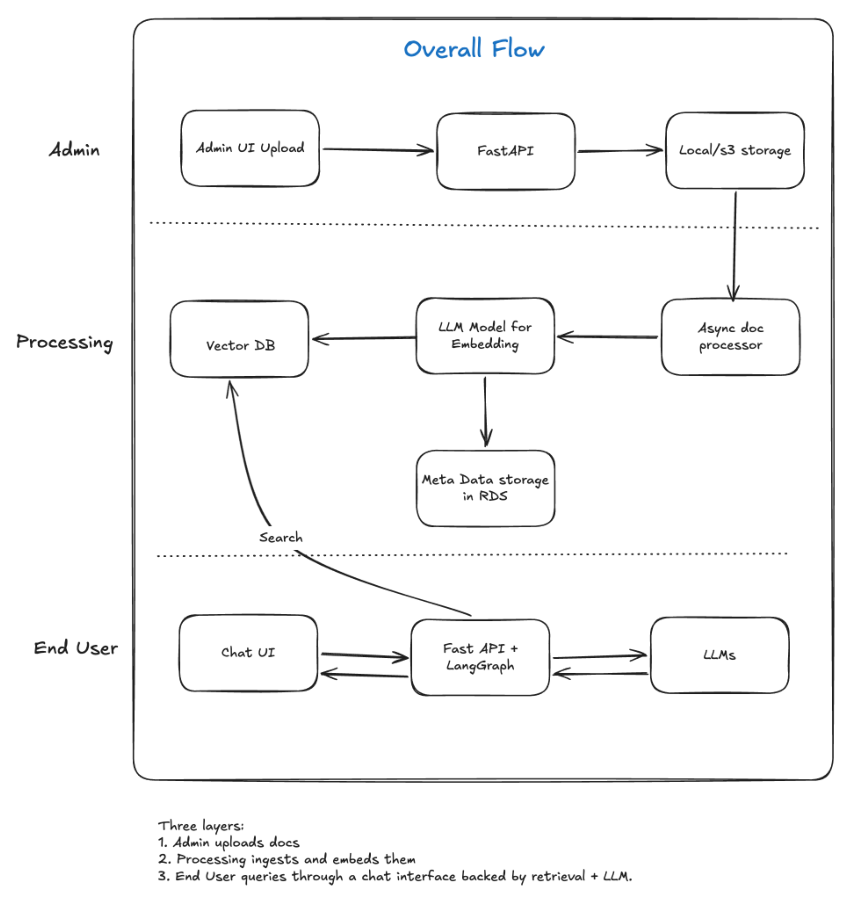
Admin Layer
| Component | Role |
|---|---|
| Admin UI Upload | Interface for administrators to upload documents |
| FastAPI | Backend API that receives upload requests and persists files |
| Local / S3 Storage | Raw document storage before processing |
Processing Layer
| Component | Role |
|---|---|
| Async Doc Processor | Background worker that picks up new uploads and runs the ingestion pipeline |
| LLM Model for Embedding | Converts document text into vector embeddings |
| Vector DB | Stores embeddings for semantic search |
| Metadata Storage (RDS) | Relational store for document metadata (filename, page count, ingestion status, etc.) |
End User Layer
| Component | Role |
|---|---|
| Chat UI | Frontend where users submit questions |
| FastAPI + LangGraph | Orchestrates the chat pipeline — retrieval, context assembly, and LLM invocation |
| Vector DB | Queried via semantic search to retrieve relevant document chunks |
| LLMs | Generates natural-language responses grounded in retrieved context |
Layer Summary
- Admin uploads docs — files land in local or S3 storage via FastAPI.
- Processing ingests and embeds them — an async worker parses, chunks, embeds, and indexes content into the vector DB and metadata into RDS.
- End user queries through a chat interface backed by retrieval + LLM, orchestrated by LangGraph.
Ingestion and Processing Pipeline
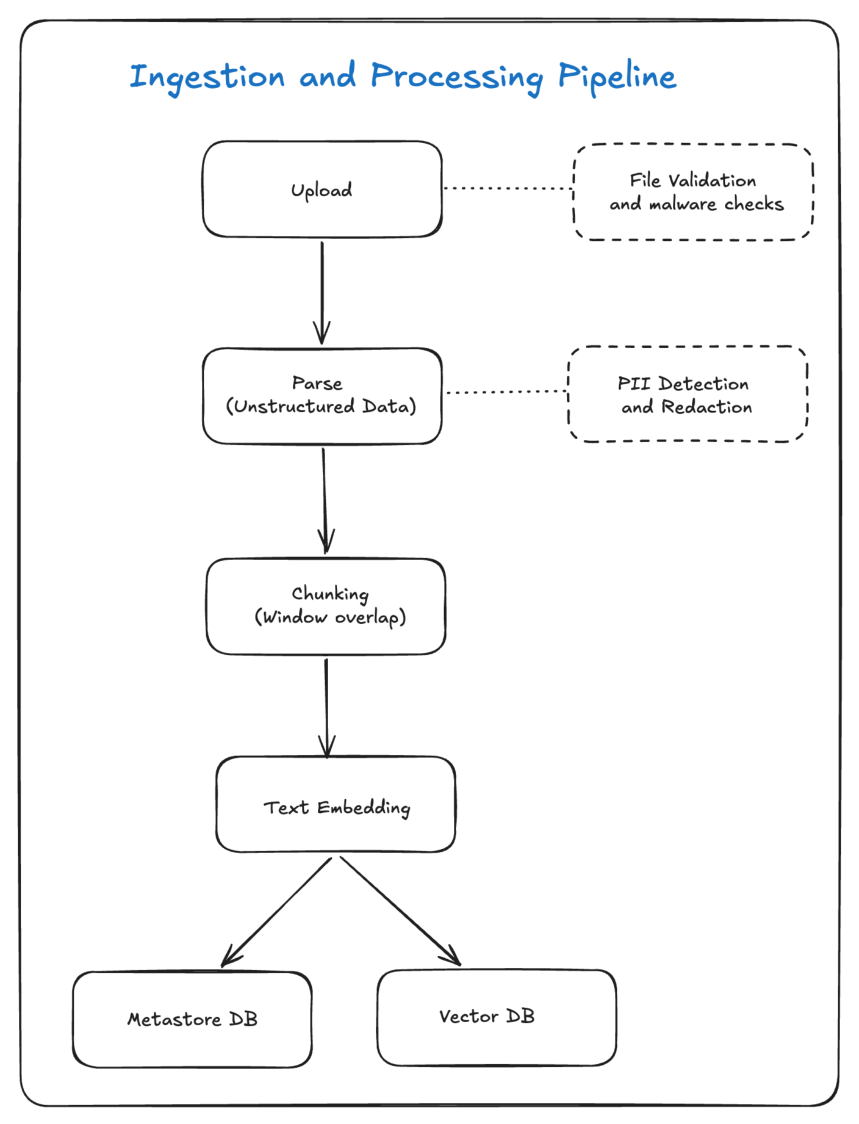
The ingestion pipeline transforms raw uploaded files into searchable vector embeddings. Each stage has associated validation and security checks.
Pipeline Stages
| Stage | Description |
|---|---|
| Upload | Admin submits a document through the upload API |
| Parse (Unstructured Data) | Extract text and structure from PDF, DOCX, HTML, and other formats |
| Chunking (Window Overlap) | Split parsed text into overlapping segments sized for embedding and retrieval |
| Text Embedding | Convert each chunk into a vector using the configured embedding model |
| Storage | Persist embeddings in the Vector DB and metadata in the Metastore DB (RDS) |
Side-Channel Checks
| Check | Applied At | Purpose |
|---|---|---|
| File Validation and Malware Checks | Upload | Reject invalid file types, oversized files, and known-malicious content before storage |
| PII Detection and Redaction | Parse | Identify and redact personally identifiable information before chunks enter the index |
Data Flow
Upload → Parse → Chunking → Text Embedding → Vector DB
                                              ↘
                                           Metastore DB (RDS)
Chat Pipeline
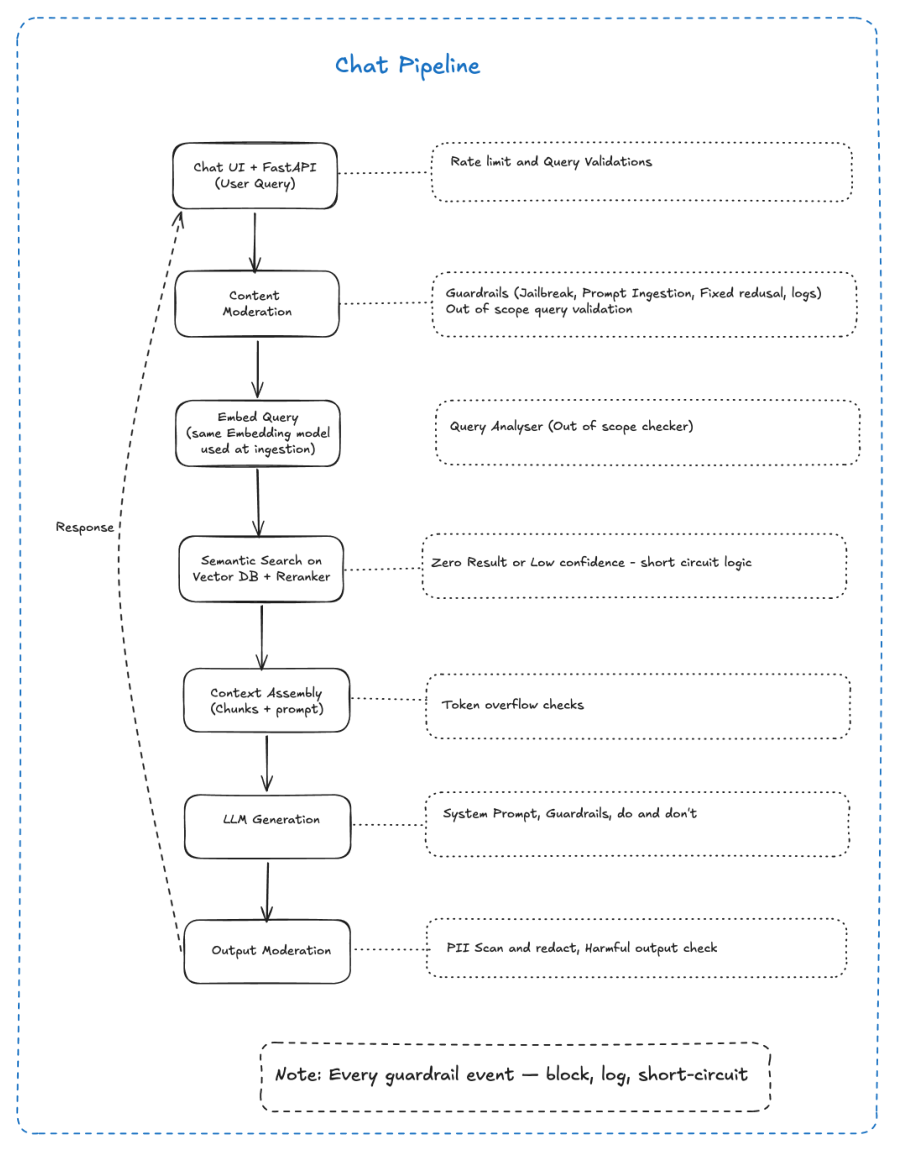
When an end user submits a query, the chat pipeline runs a sequential flow from input validation through retrieval, generation, and output moderation. LangGraph manages the orchestration, enabling conditional branching (e.g., short-circuit on zero results or low confidence).
Pipeline Stages
| # | Stage | Description |
|---|---|---|
| 1 | Chat UI + FastAPI (User Query) | User submits a question; FastAPI receives and validates the request |
| 2 | Content Moderation | Screen the incoming query for policy violations |
| 3 | Embed Query | Convert the user query into a vector using the same embedding model used at ingestion |
| 4 | Semantic Search on Vector DB + Reranker | Retrieve top-k chunks and rerank for relevance |
| 5 | Context Assembly (Chunks + Prompt) | Combine retrieved chunks with a system prompt template |
| 6 | LLM Generation | Invoke the LLM with assembled context to produce a response |
| 7 | Output Moderation | Scan and filter the generated response before returning to the user |
Guardrails by Stage
| Stage | Guardrail |
|---|---|
| Chat UI + FastAPI | Rate limiting and query validation |
| Content Moderation | Jailbreak detection, prompt injection checks, fixed refusal responses, out-of-scope query validation, event logging |
| Embed Query | Query analyser — out-of-scope checker |
| Semantic Search | Zero-result or low-confidence short-circuit logic |
| Context Assembly | Token overflow checks against the model's context window |
| LLM Generation | System prompt, guardrails, and explicit do/don't instructions |
| Output Moderation | PII scan and redaction, harmful output check |
Note: Every guardrail event — block, log, short-circuit.
Chat Data Flow
User Query
    │
    ▼
Content Moderation
    │
    ▼
Embed Query ──→ Vector DB (Semantic Search + Reranker)
    │
    ▼
Context Assembly
    │
    ▼
LLM Generation
    │
    ▼
Output Moderation
    │
    ▼
Response → Chat UI
Component Interactions
FastAPI + LangGraph
LangGraph orchestrates the chat pipeline as a state machine with explicit nodes for each stage. This enables:
- Conditional edges — short-circuit when semantic search returns zero results or scores below a confidence threshold.
- Retry and fallback — rerank with alternate parameters or return a fixed refusal message.
- Observability — each node transition is logged, making it straightforward to trace a query end-to-end.
Embedding Model Consistency
The same embedding model must be used at both ingestion and query time. Mixing models (e.g., text-embedding-ada-002 at ingestion and a different model at query time) produces incompatible vector spaces and degrades retrieval quality.
Vector DB and Metastore
| Store | Contents |
|---|---|
| Vector DB | Chunk embeddings with references to source document and chunk index |
| Metastore DB (RDS) | Document metadata — filename, upload timestamp, processing status, page count, admin owner |
The vector DB handles similarity search; RDS handles administrative queries (list documents, re-ingest, delete).
Security and Guardrail Design
Ingestion Guardrails
- File validation at upload rejects unsupported formats and enforces size limits.
- Malware scanning prevents malicious files from entering the processing pipeline.
- PII redaction at parse time ensures sensitive data does not enter the vector index or LLM context.
Chat Guardrails
- Input moderation blocks jailbreak attempts, prompt injection, and out-of-scope queries before any retrieval or generation occurs.
- Rate limiting at the API layer prevents abuse and controls cost.
- Token overflow checks at context assembly prevent exceeding the LLM's context window, which would silently truncate retrieved evidence.
- Output moderation scans generated responses for PII leakage and harmful content before delivery.
Audit and Observability
Every guardrail event — whether a block, a log entry, or a short-circuit — is recorded. This supports compliance review, debugging retrieval quality, and tuning confidence thresholds over time.
Key Design Decisions
Why LangGraph over a linear LangChain chain? The chat pipeline has multiple conditional branches (zero results, low confidence, out-of-scope queries). LangGraph's graph-based orchestration makes these branches explicit and testable, whereas a linear chain would require nested conditionals that are harder to maintain and observe.
Why async processing for ingestion? Document parsing, chunking, and embedding are CPU- and I/O-intensive. Decoupling ingestion from the upload API keeps the admin UI responsive and allows horizontal scaling of workers independently of the API tier.
Why separate Vector DB and Metastore DB? Vector databases are optimised for similarity search but poor at relational queries (filter by upload date, list by admin, track processing status). RDS handles metadata and administrative operations; the vector DB handles retrieval. Keeping them separate avoids compromising either workload.
Why reranking after semantic search? Initial vector search returns candidates by cosine similarity alone. A cross-encoder reranker re-scores those candidates against the actual query, improving precision — especially when chunks from multiple documents compete for the same top-k slots.
Why guardrails at every stage rather than only at input and output? Mid-pipeline guardrails (query analyser, zero-result short-circuit, token overflow checks) prevent wasted LLM calls and reduce the attack surface. Catching an out-of-scope query before retrieval is cheaper and safer than sending it to the LLM and moderating the output.